AI ULTRA FESTIVAL / HONG KONG
Vibe FilmingAI Video from Idea to Screen AI 影片創作:從構想到成片
HolyCrab × Seedance 2.5 × MiniMax H3
Bruce Huang · Sunday 13 September 2026 · 60 minutes
00:00–01:00. Welcome to Vibe Filming: AI Video from Idea to Screen. We will explore how ideas become AI videos through direction, model choice, prompts, reusable assets and editing. One Shot generation is one capability within that workflow, alongside reference-guided sequences, editing and extension. The hands-on example uses two connected 10-second clips to teach asset reuse and continuity. You may use your own authorized face or an original fictional AI character. This exercise is one application of the broader workflow, not the topic of the entire workshop. You decide whether to show your result. START HERE
Everything you need 掃碼領取教材,現在就打開
Join the WhatsApp group to claim 500 credits. 50 workshop allocations available.
SCAN FOR THE TOOLKIT brucehuang.ai / workshop toolkit 01:00–03:00. Scan the workbook. 500 credits per participant, 50 allocations, through the WhatsApp group. The group link is an intentional placeholder until Bruce adds it. Web and API credits use the same pricing. Choose your own face or the fictional AI-face track. Staff explain the real-person verification flow privately. Your authorization QR is different from this public material QR and must not be projected or shared in the group. No account setup or credit issuance has been performed by preparing these materials. Hunan TV / Mango TV · trailer excerpt · 45sPlayback / 影片播放 INDUSTRY / AI LONG-FORM DRAMA
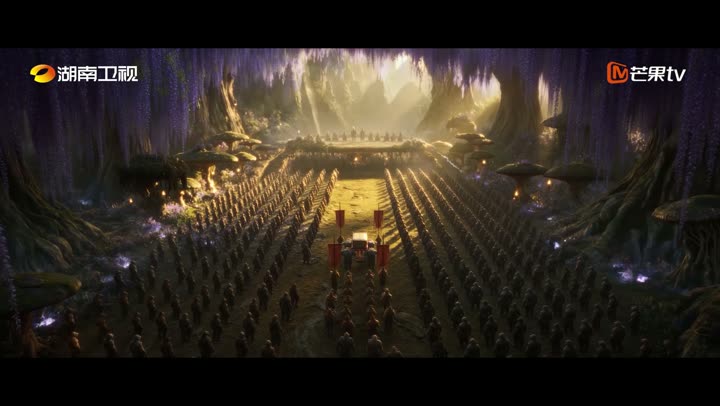
AI filmmaking is 《後西遊記》:AI 長劇已進入製作與播出流程
03:00–03:45. Play the 45-second opening excerpt with sound. Hou Xi You Ji is a Mango TV production broadcast on Hunan TV and Mango TV from 31 August 2026. This is a third-party industry example. The point is that AI video has entered real long-form production and broadcast workflows. Source: supplied partner presentation slide 3; broadcaster announcement linked in the workbook. The complete trailer is about 2m20s; this classroom excerpt is 00:00–00:45. A prompt is one part of the production process.Playback / 影片播放 FROM THE PRODUCTION FLOOR
The workflow keeps 劇本、角色、場景和道具都要留下
A prompt is one part of the production process.
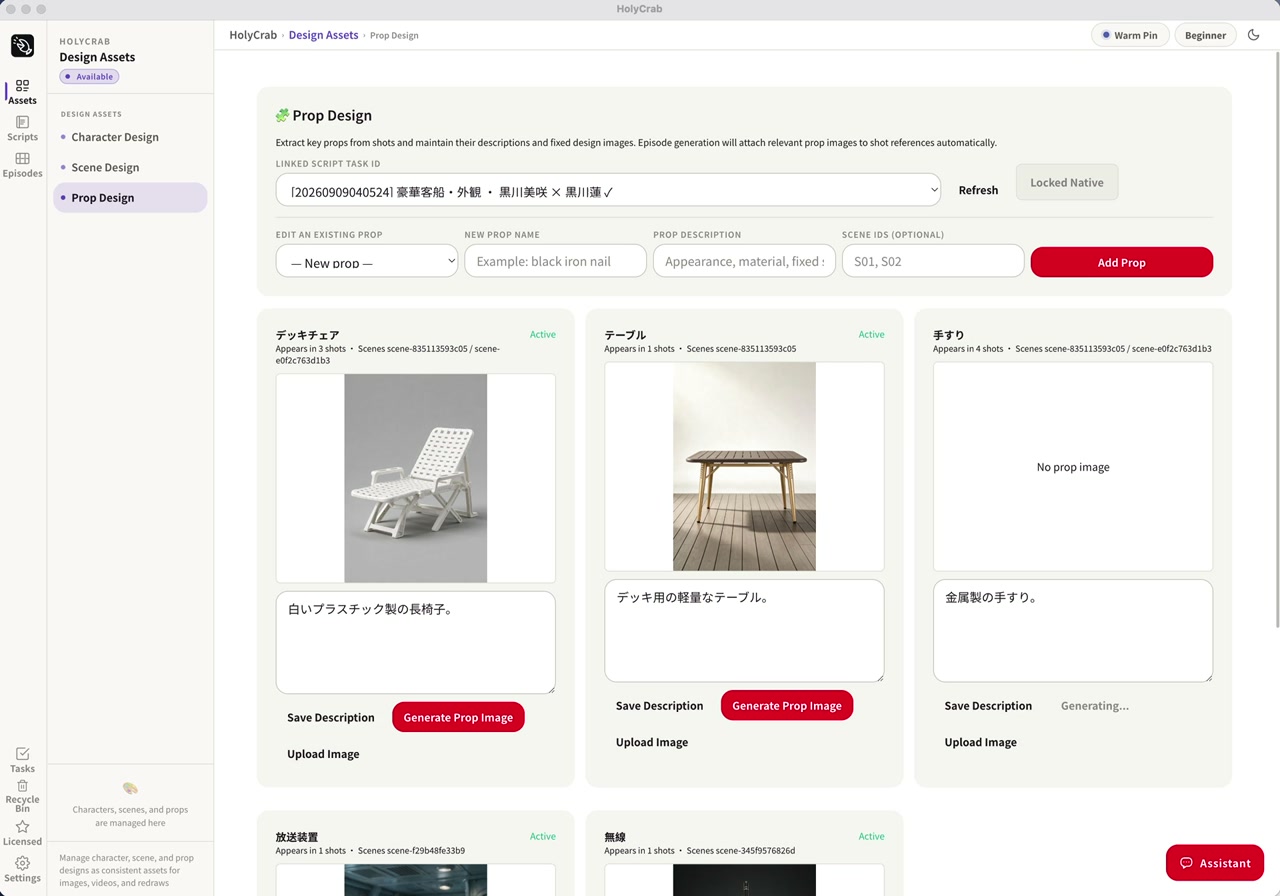
03:45–05:00. Explain the production chain: script, character design, scene design, prop design, shot generation and review. The screenshot shows the actual production system from our partner deck. It is a production demonstration, not a promise that every account exposes this desktop system. The classroom uses the public web generator. Source: supplied partner deck, slide 9. Actual production interface · optional recordingPlayback / 影片播放 REPEATABLE PRODUCTION
A production system 工業化的價值,是知道哪一鏡需要修
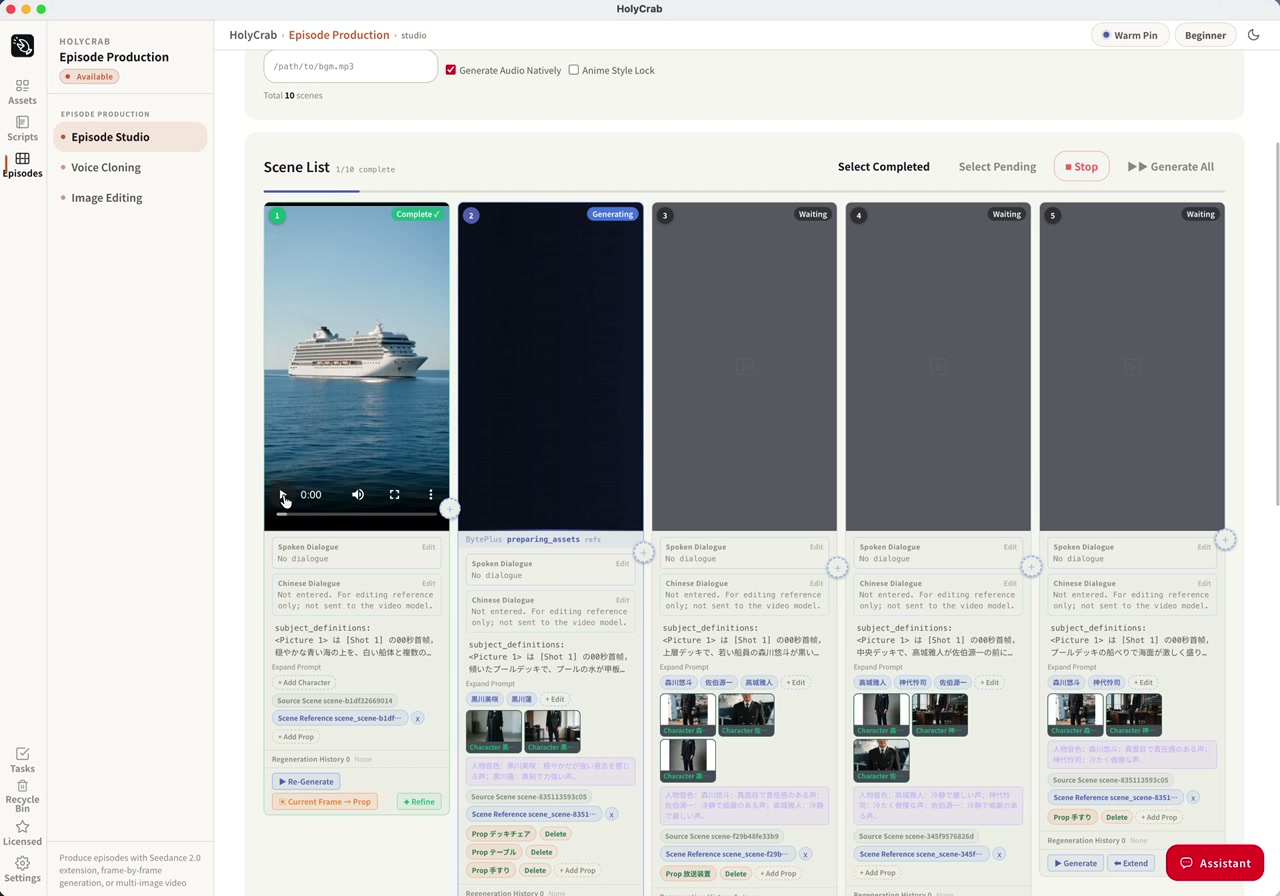
05:00–06:00. Show the complete screenshot first. Point to the different states of the shots. We can track what is complete, waiting and generating, and which character or prop references belong to each shot. The public deck includes a short excerpt from the end of the recording, when a result is visible; the full internal recording is not bundled. Source: partner deck, slide 10. INDUSTRY CONTEXT
Industrial production 從角色與鏡頭生成,到剪輯、審核與播出
01 AI long-form drama has reached TV audiences.
02 Production still needs direction, assets and review.
06:00–07:00. Connect the broadcast trailer to the production interfaces just shown. Say: AI video has already entered industrial production. A released television drama needs a coordinated pipeline: story, character and scene assets, shot generation, revision, editing and delivery. Hou Xi You Ji is the Hunan TV / Mango TV industry reference; the HolyCrab system shown separately is our production workflow. Avoid implying HolyCrab produced that drama, and omit unverified model, cost, stock-price or ratings claims. HolyCrab H3 music-video demo · 30s excerptPlayback / 影片播放 HOLYCRAB / MINIMAX H3 / MUSIC VIDEO
Performance, rhythm. 人物表演、統一視覺與節奏剪輯
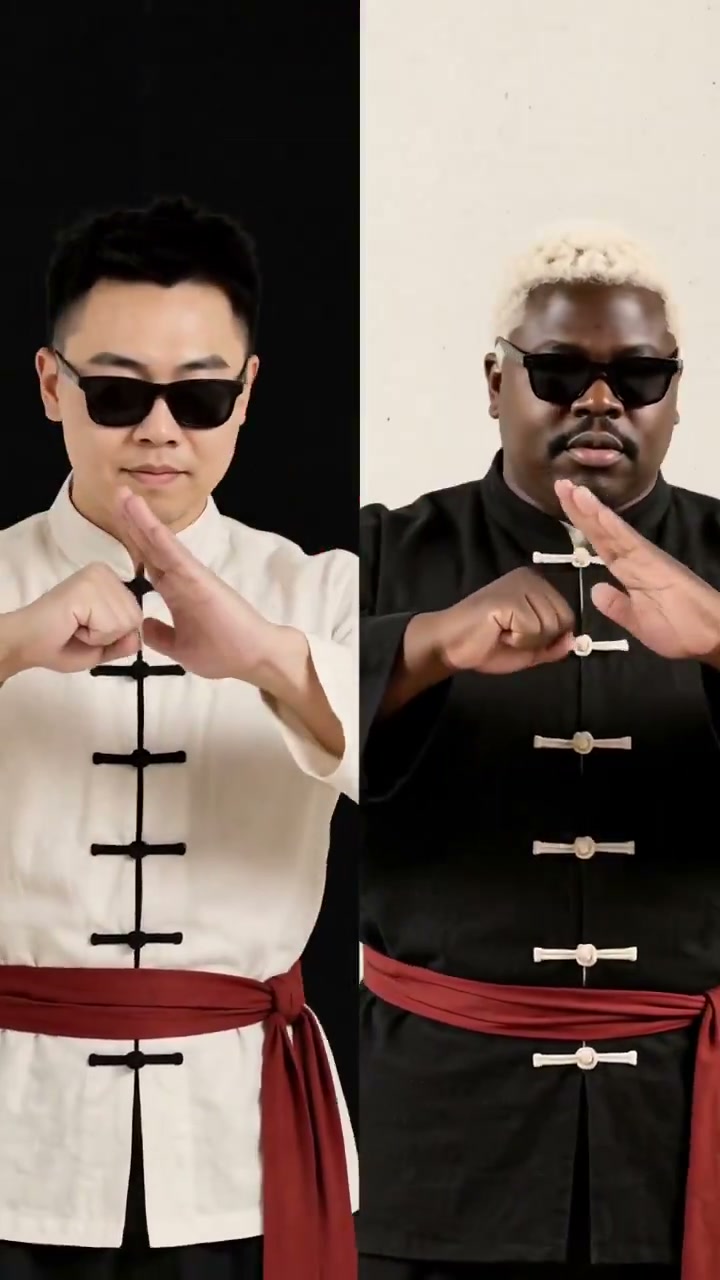
07:00–08:00. Play the first 30 seconds with sound, then spend 30 seconds unpacking the craft. Notice the two performers, black-and-white costumes with red belts, shared graphic palette and cuts between close, medium and full-body views. The HolyCrab post identifies MiniMax H3; it does not disclose every production step or claim this was a single generation. Explain the roles of performance, repeated visual assets and music-led editing without inventing the original prompts. The complete 61.416-second video is in the workbook. Source: https://x.com/holycrabAI/status/2098092554093039735 . Treat this as a HolyCrab-posted model demonstration, not an official artist commission. MODEL CHOICE
Build a workflow 單鏡頭、素材、修改與延展,按創意需要組合
01 One Shot: create a complete scene.
02 References: carry assets across shots.
03 Edit & extend: refine the story.
08:00–09:00. One Shot is a single generated scene, one capability within AI video creation. Reference assets help carry a person, design or scene state into another shot; editing and extension help refine or continue existing work. Availability differs by model and interface. H3 is the lower-priced short text-only example in our quote comparison; its official release includes native audio. Seedance 2.5 is our hands-on model because the current HolyCrab interface exposes reference and first-frame workflows. Do not assume H3 has identical asset or authorization controls. For the exercise use Seedance 2.5 for both A and B. See official sources in the toolkit. DATED QUOTES / 12 SEP 2026
A useful comparison 每次提交前,都看這一條的估價
H3 6s · 768P · 16:9 $0.60
Seedance 2.5 6s · 480p · 16:9 $0.83
Seedance 2.5 6s · 720p · 16:9 $1.81
Text-only estimates · resolutions differ · re-quote before submitting
09:00–10:00. These are free estimate responses checked on 12 September 2026 for text-only requests. Resolutions differ, so do not call this a same-resolution price comparison. Input assets, duration, model settings and current tariffs can change the quote. 1 API credit = US$0.01. The estimate is not the final settlement. For the room, use the quote and the allocated event balance displayed at submission time. Source: local live estimate receipts; no paid generation submitted. PROMPT DESIGN
A clear prompt names 主體和核心動作放在最前面
01 A portrait tells the model who appears.
02 A saved frame tells the next shot where to start.
10:00–11:00. Explain the asset chain. A portrait is an identity reference; the final frame is the state of the scene at a specific moment. We will deliberately end A with a still pose, then carry that exact image into B. The main exercise has no dialogue to keep attention on visual continuity; review sound across the seam too. IP AND PEOPLE
Your face stays 本人完成驗證,照片才進入授權素材
01 Complete the real-person verification yourself.
02 Prefer not to upload? Choose an original AI face.
11:00–12:00. Explain HolyCrab’s real-person flow: identify or create the participant’s authorized group, privately show the official verification link, participant completes the steps and official callback, wait for SUCCEEDED, then upload the chosen photo into that authorized group and wait for ready:true. Do not use ordinary upload as a workaround for failed verification. Authorization is not a paid-generation approval. Protected IP still requires relevant rights and platform scope. This is an individual choice; no one needs to submit their own face to participate. CLI / 1 OF 3
Your agent can use 進階示範:先安裝,再檢查
# macOS / Linux
curl -fsSL https://holycrab.ai/cli/install.sh | sh
holycrab --version
holycrab --help
Copy commands / 複製 12:00–13:00. Five-minute CLI demonstration begins. Use the installation command copied from the current official CLI page. Preinstall on the presenter machine; show the command rather than waiting for the room to install. The official installer requires Python 3.10+ and documents macOS/Linux. Windows participants use the web track unless their agent environment is already configured. Everyone else stays on the web track. After installation, restart the terminal if holycrab is not found. Source: https://holycrab.ai/cli/ and official CLI help. CLI / 2 OF 3
The key stays 活動 Key 私下設定,使用與本人素材相符的帳戶
holycrab setup
holycrab auth status
holycrab models list
holycrab models show dreamina-seedance-2-5-260628
Copy commands / 複製 13:00–14:00. Configure privately before projection. Match CLI access with the participant’s web account and authorized assets. A shared workshop key is not proof of access to another account’s authorized group. Staff can supply appropriate event access privately. Never put a real key in this slide, prompt or download. CLI / 3 OF 3
Give the agent 完整指令可掃碼複製
01 Fetch two prompts. Track assets. Quote each shot. Save task IDs.
Open complete instruction / 開啟完整指令 14:00–17:00. Five-minute CLI demo finishes here. Use the complete instruction below; demonstrate asset list/readiness and request preparation on a preconfigured environment. No need for everyone to install. Estimate is free; paid submission still needs specific approval.
Use the installed official HolyCrab skill and current CLI help. Help me create two connected 10-second Seedance 2.5 clips at 480p, within 500 credits total. A starts at 16:9; B uses frames mode and adaptive ratio. First ask whether I choose my own face or an original fictional AI face. Fetch clip-a-en.txt and clip-b-en.txt from https://brucehuang.ai/talks/ai-ultra-video-workshop-2026-09/prompts/; use ai-face.txt for fictional Clip A. Save all working files locally.
For my own face, check my existing authorized group. Only start a new authorization if I request it. Show the temporary verification link/QR privately to me; I complete verification myself. Never save that link/QR in files, logs or the public kit. After SUCCEEDED, upload only my selected portrait into my own authorized group and wait for ready:true. Never bypass failed verification with ordinary upload. Use my web account's matching CLI access; do not assume another key can use my group.
Prepare Clip A with the returned ready public portrait asset ID in imageAssetIds. For the fictional route, prepare A as text-only. Estimate the actual payload and show credits, settings and remaining balance privately. Planning quote: A 139 + B 139 = 278 credits; one optional 10s retry brings the total to 417. Quotes can change with actual assets. Keep a cumulative ledger, and stop before exceeding 500. Wait for my explicit approval before each paid submission; do not treat this instruction as approval. Submit once, record the task ID immediately, and recover that existing task after interruption.
Download completed A as clip-a.mp4. Extract and inspect its last frame as last-frame.png. For my real face, upload this derived frame to my same authorized group and wait for ready:true; stop if the service does not accept the group/frame route, without trying an ordinary-upload bypass. For the original fictional face, use ordinary asset upload. Prepare B with firstFrameAssetId set to this new ready asset ID, videoTaskType frames, ratio adaptive, 10 seconds, 480p. Do not combine frames with imageAssetIds or other reference arrays. Re-estimate B and ask for approval, then submit exactly once and download clip-b.mp4. Place A then B in an editor, inspect the seam and audio, and export the 20-second film. Keep source portrait/frame IDs, prompts, settings, quotes, task IDs and review notes. Never print credentials or clone my real voice. Ask separately before sharing my output.
使用 HolyCrab 官方 skill 和目前 CLI help,在500 credits總額內準備兩段10秒Seedance2.5、480p影片。A用16:9;B用frames模式、adaptive比例。先確認我選本人或原創AI臉。本人需親自完成私下驗證,SUCCEEDED後才把指定照片上傳到本人授權群組,等待ready:true;不能普通上傳繞過授權失敗。AI臉的A用純文字。逐條估價並取得明確確認才付費提交,立即保存task ID,中斷找回同一任務。預算A139+B139=278,一次10秒重試後417,實際素材需重新估價,不超過500。下載A,抽取並檢查末幀;真人末幀必須回到本人同一授權群組,等ready。B只以此素材作firstFrameAssetId,不混用imageAssetIds或其他參考。再估價、確認、提交、下載B。剪輯器中依次放A和B,檢查接點與聲音,輸出20秒影片。保存素材ID、Prompt、參數、估價、task ID和檢查紀錄。私密驗證連結/QR及Key不進入文件、日誌或群聊;不可代本人驗證。 500 CREDITS / ONE PLAN
Two shots fit. 每人500 credits,預留一次完整重試
Main exercise 10s + 10s 278 cr
With one retry 10s × 3 417 cr
Remaining 500 − 417 83 cr
Planning estimates · actual assets need a fresh quote · 12 Sep 2026
17:00–18:00. Free quotes checked12Sep2026: Seedance2.5 480p10s139credits,15s209,30s418. Two15sclips cost418, leaving82 insufficient for another15sclip. Two30sclips cost836, over500. Choose10s×2 for a workshop with room for one retry. Re-estimate actual portrait and frame inputs before each submission. Real-person derived-frame submission has not been rehearsed in preparation. Use only a route accepted by the participant’s account. THE ASSET CHAIN
A ends where 首尾幀銜接:A末幀 → B首幀
01 Portrait → Clip A → last-frame.png.
02 Ready frame asset → Clip B → 20-second edit.
18:00–20:00. Live web demo. A is a10-second portrait reference shot at480p16:9. End with a still smile and closed mouth. Download A and extract its final frame locally. Upload that frame to the same authorized group, wait ready, select it as B’s first frame. B uses frames mode,10s480p, adaptive ratio (inherits the first frame). Do not add the original portrait again as a reference in frames mode. Same pixels at the cut guide continuity; generated movement afterward still needs review. HANDS-ON / SET UP
Claim your credits. 20–25分鐘:領額度,選本人或AI人臉
500 credits each · 50 allocations. Join the WhatsApp group and ask our team.
SCAN FOR THE TOOLKIT brucehuang.ai / workshop toolkit 20:00–25:00. Staff help login and group claims. The WhatsApp link is an intentional placeholder until Bruce adds it. For a real face, find/create the participant’s own authorized group, have them complete private verification, wait SUCCEEDED, then upload their selected portrait and wait ready:true. Use matching account scope. Start verification help during the opening. If pending at25minutes, save the ID and offer the fictional AI-face route; never bypass verification using ordinary upload. A / IDENTITY REFERENCE
Clip A establishes 25–30分鐘:10秒,16:9,480p
@Image 1 defines my face and hairstyle. One adult in a plain navy jacket stands beside a Hong Kong harbour railing at golden hour. Preserve the referenced identity. Begin waist-up, then slowly push in as I turn from the harbour toward the lens. I settle into a relaxed smile, hands still on the railing. Hold the final pose for the last two seconds, mouth closed. Keep one person, the same clothes and warm light. Soft harbour ambience; no speech, music, text or logos.
Copy text / 複製 25:00–30:00. Choose Seedance2.5 reference,10s16:9 480p. Select the one ready authorized portrait and use the real UI image label in place of @Image1. Paste this complete prompt. Check the actual estimate and balance. Submit once and save task ID. AI-face participants use the alternative in the next slide. No speech is requested; this exercise does not clone a real voice. A / OPTIONAL FICTIONAL FACE
No photo needed 選用:原創虛構人物,同樣練習素材銜接
Create an original fictional adult with short dark hair; do not imitate a named real person. One adult in a plain navy jacket stands beside a Hong Kong harbour railing at golden hour. Keep this fictional face consistent. Begin waist-up, then slowly push in as I turn from the harbour toward the lens. I settle into a relaxed smile, hands still on the railing. Hold the final pose for the last two seconds, mouth closed. Keep one person, the same clothes and warm light. Soft harbour ambience; no speech, music, text or logos.
Copy text / 複製 25:00–30:00 alternative. This is text-only Clip A: no real portrait upload. Keep10s16:9 480p Seedance2.5. Its output supplies the same last-frame asset for B, so this route teaches the identical continuity skill. Say clearly that the person is fictional. Recheck quote before submitting. A / REVIEW + EXTRACT
Inspect the ending 30–34分鐘:先下載A,再抽取末幀
01 Choose a clear face, still hands and a stable pose.
02 Download A. Extract its final frame as a PNG.
Open complete instruction / 開啟完整指令 30:00–34:00. Watch completed A from start to finish. Check identity, hands, jacket, light, and whether the last two seconds hold a stable pose. Download clip-a.mp4. Open the local frame tool from the workbook, select that file, extract its last displayed frame and inspect the PNG. If A is queued, keep the ID; do not submit duplicates. If A’s final frame is unusable, spend the optional retry only after a new quote and approval. B / FRAME ASSET
Save the frame 34–37分鐘:上傳末幀,等ready,再綁定B
01 Real face: use your same authorized asset group.
02 Clip B: choose the frame as its first frame only.
34:00–37:00. Upload last-frame.png. For a real face, keep it in the same participant’s authorized group in the same account. Wait ready:true and record the public frame asset ID. An AI fictional-face frame uses ordinary upload. If the authorized derived-frame route is rejected, preserve the error for staff and stop that route; no ordinary-upload workaround. In B frames mode use firstFrameAssetId only, without imageAssetIds or other references. The model inherits the first frame’s ratio, represented as adaptive in the request. The final frame input is optional; A’s last frame becomes B’s first frame. B / FIRST-FRAME CONTINUATION
Clip B continues 37–43分鐘:10秒,首幀模式,480p
Start exactly from the supplied first frame. Preserve the same person's face, hairstyle, navy jacket, hand positions, railing, harbour and golden-hour light. Hold that pose briefly, then make one slow, small camera arc to reveal more of the harbour. The person keeps a relaxed smile, mouth closed, and remains recognizable. Finish with the person and harbour both visible. Keep one person. Soft harbour ambience; no speech, music, text or logos. Do not restart the previous turn.
Copy text / 複製 37:00–43:00. Select the ready A-end-frame as B’s first frame. Do not put the portrait in the reference panel at the same time. Use Seedance2.5 frames,10s480p,adaptive ratio. Read the quote for the actual asset; approve and submit once if the cumulative plan is within500credits. Save B’s task ID. A matched starting frame helps the cut but does not guarantee face/hand consistency during motion. EDIT / CONTINUITY CHECK
Cut A to B. 43–50分鐘:拼接20秒成片,檢查接點
01 Place A, then B, in your video editor.
02 Check face, hands, light, motion and sound at the cut.
43:00–50:00. Download B and open A then B on one timeline in the participant’s available editor, e.g. CapCut/剪映. Use a straight cut first. Watch two seconds before and after the seam. Confirm identity, head/hand position, jacket, light, camera direction and horizon. Generated ambience can jump even with matching images: adjust audio or mute both if needed. Trim a duplicated still hold if desired, making the final duration slightly shorter than20s. Export and play the downloaded final file. If queued, save IDs and finish later. SAVE / THE REUSABLE RECIPE
The asset history 保留原始素材、兩段影片、參數與任務ID
01 Portrait + frame IDs + A/B task IDs.
02 Prompts + settings + quotes + one seam review.
During43–50minutes. Save local files as clip-a.mp4,last-frame.png,clip-b.mp4,final.mp4,prompt-a.txt,prompt-b.txt and a manifest. The manifest records asset source and role, model, settings, actual quotes and cumulative credit spend. Do not include private authorization links/QR or keys. A preview is not a finished offline export. SHOW AND TELL
Show the join. 50–52分鐘:兩位學員,各分享一分鐘
01 Play the cut from A to B.
02 Which asset helped? What would you change?
50:00–52:00. Invite two volunteers,60seconds each. Ask them to show the seam and explain one production decision. Participation does not grant permission to publish their face, source photo or result. Only show or repost what the person agrees to share. KEEP CREATING
Bring your next 從今天的20秒,走向自己的製作流程
Keep the toolkit. Join our WhatsApp group. Talk to the team about your next video.
SCAN FOR THE TOOLKIT brucehuang.ai / workshop toolkit 52:00–54:00. The credit offer is500each×50allocations through WhatsApp. Materials are publicly downloadable without joining. Invite participants to tell staff what they want to make and which assets they can use. The group link remains a placeholder until Bruce supplies it. No automatic follow-up messages or public collection of face assets. Q&A / BUFFER
Time for questions 54–60分鐘:問答、排隊緩衝與現場協助
01 Prompt, model choice, face assets or CLI.
02 Keep task IDs if your clips are still processing.
54:00–60:00. Protect this six-minute buffer. Staff help recover existing tasks and downloads, not repeated submissions. If a job cannot complete in class, the participant keeps a valid task ID and recipe, then finishes after class. Do not promise fixed queue times. APPENDIX / ASSET UPLOAD
The same group 附錄:真人末幀仍屬於本人授權素材
holycrab assets upload ./last-frame.png \
  --real-human-group GROUP_ID
holycrab assets wait FRAME_ASSET_ID --timeout 60
Copy commands / 複製 Replace GROUP_ID and FRAME_ASSET_ID with actual public IDs. Use the same successfully authorized group as the original portrait, and matching account access. The end frame includes the person’s face. Wait ready:true. Preparation did not execute this real-person derived-frame chain; verify on the presenter’s account before class. Failed group/frame acceptance is a stop, not permission to upload ordinarily.
# After personal authorization SUCCEEDED, use your returned public group ID.
holycrab assets upload ./my-portrait.jpg --real-human-group GROUP_ID
holycrab assets wait PORTRAIT_ASSET_ID --timeout 60
# After A completes, reuse the SAME authorized group for its derived frame.
holycrab assets upload ./last-frame.png --real-human-group GROUP_ID
holycrab assets wait FRAME_ASSET_ID --timeout 60
# B uses FRAME_ASSET_ID only as firstFrameAssetId. No imageAssetIds. APPENDIX / REQUEST B
Frames mode has 附錄:B不混用人像參考陣列
videoTaskType: "frames"
firstFrameAssetId: FRAME_ASSET_ID
ratio: "adaptive"
duration: 10, resolution: "480p"
Copy commands / 複製 These are request fields, not terminal commands. Download seedance-continuation.template.json and replace the marked frame ID. No imageAssetIds or other reference arrays. Mixing reference assets with first/last frames produced HTTP400 in a free estimate. A last frame cannot be provided without a first frame. Our main exercise supplies only the first frame; it is A’s last frame. APPENDIX / FREE QUOTE
Estimate the actual 附錄:每段影片分別核價
holycrab generate estimate --kind video \
  --json @request-a.json
holycrab generate estimate --kind video \
  --json @request-b.json
Copy commands / 複製 Save seedance-face.template.json (or seedance-ai.json) as request-a.json. Save seedance-continuation.template.json as request-b.json. Replace marked asset IDs with returned ready IDs. Actual image/frame input can change costs. Price quote is not final settlement. Do not submit template placeholders. For fictional Clip A use the complete seedance-ai.json. B still needs the real generated end-frame asset.
# Save the A template as request-a.json and B template as request-b.json.
# Replace each marked asset ID with its returned ready ID.
holycrab generate estimate --kind video --json @request-a.json
# Quote B separately after its actual frame asset is ready.
holycrab generate estimate --kind video --json @request-b.json APPENDIX / EXTRACT
A local tool can 附錄:免安裝瀏覽器工具,也可用FFmpeg
ffmpeg -sseof -0.2 -i clip-a.mp4 \
  -update 1 last-frame.png
Copy commands / 複製 The workbook links a local-file browser frame extractor. It does not send your selected video to a generation service; uploading the resulting frame is a separate deliberate step in HolyCrab. The optional FFmpeg command decodes the final0.2seconds and keeps updating one PNG until the final frame. Inspect it before upload. Do not overwrite an existing wanted frame; choose another filename.
# Optional local FFmpeg route; the browser tool needs no installation.
# Decode the final 0.2 seconds and keep the last decoded frame.
ffmpeg -sseof -0.2 -i clip-a.mp4 -update 1 last-frame.png
# Inspect the PNG before uploading it. Use a new filename if it already exists. APPENDIX / RECOVERY
Recover the task. 附錄:中斷後,用原任務ID繼續
holycrab tasks list --page 1 --page-size 10
holycrab tasks get TASK_ID
holycrab tasks wait TASK_ID --timeout 120
holycrab download TASK_ID --output ./clip-a.mp4
Copy commands / 複製 Replace TASK_ID with the saved task. A wait timeout does not mean the task failed. Download only completed tasks; use clip-b.mp4 for B. No paid generation command is supplied as an automatic step.
holycrab tasks list --page 1 --page-size 10
holycrab tasks get TASK_ID
holycrab tasks wait TASK_ID --timeout 120
holycrab download TASK_ID --output ./clip-a.mp4 APPENDIX / PERSONAL AUTHORIZATION
Verification happens 附錄:臨時授權連結與QR不投屏
holycrab real-human groups list
holycrab real-human start --name "My workshop portrait"
holycrab real-human wait AUTHORIZATION_ID --timeout 60
Copy commands / 複製 Only start a new authorization when the participant requests it. They complete it themselves. Show returned temporary link/QR privately, never write it to the public kit or logs. Preserve the authorization ID after timeout. SUCCEEDED permits the authorized upload path; it does not approve paid generation.
holycrab real-human groups list
# Only when the participant requests a new authorization:
holycrab real-human start --name "My workshop portrait"
# Keep the returned link/QR private; complete verification yourself.
holycrab real-human wait AUTHORIZATION_ID --timeout 60 APPENDIX / AGENT SCRIPT
The complete agent 附錄:完整操作指令,可下載與複製
Use the installed official HolyCrab skill and current CLI help. Help me create two connected 10-second Seedance 2.5 clips at 480p, within 500 credits total. A starts at 16:9; B uses frames mode and adaptive ratio. First ask whether I choose my own face or an original fictional AI face. Fetch clip-a-en.txt and clip-b-en.txt from https://brucehuang.ai/talks/ai-ultra-video-workshop-2026-09/prompts/; use ai-face.txt for fictional Clip A. Save all working files locally.
Copy text / 複製 Copy the combined version from the workbook for execution. This part is printed in the deck so the complete script remains in the PPT/PDF.
Use the installed official HolyCrab skill and current CLI help. Help me create two connected 10-second Seedance 2.5 clips at 480p, within 500 credits total. A starts at 16:9; B uses frames mode and adaptive ratio. First ask whether I choose my own face or an original fictional AI face. Fetch clip-a-en.txt and clip-b-en.txt from https://brucehuang.ai/talks/ai-ultra-video-workshop-2026-09/prompts/; use ai-face.txt for fictional Clip A. Save all working files locally. APPENDIX / AGENT SCRIPT
The complete agent 附錄:完整操作指令,可下載與複製
For my own face, check my existing authorized group. Only start a new authorization if I request it. Show the temporary verification link/QR privately to me; I complete verification myself. Never save that link/QR in files, logs or the public kit. After SUCCEEDED, upload only my selected portrait into my own authorized group and wait for ready:true. Never bypass failed verification with ordinary upload. Use my web account's matching CLI access; do not assume another key can use my group.
Copy text / 複製 Copy the combined version from the workbook for execution. This part is printed in the deck so the complete script remains in the PPT/PDF.
For my own face, check my existing authorized group. Only start a new authorization if I request it. Show the temporary verification link/QR privately to me; I complete verification myself. Never save that link/QR in files, logs or the public kit. After SUCCEEDED, upload only my selected portrait into my own authorized group and wait for ready:true. Never bypass failed verification with ordinary upload. Use my web account's matching CLI access; do not assume another key can use my group. APPENDIX / AGENT SCRIPT
The complete agent 附錄:完整操作指令,可下載與複製
Prepare Clip A with the returned ready public portrait asset ID in imageAssetIds. For the fictional route, prepare A as text-only. Estimate the actual payload and show credits, settings and remaining balance privately. Planning quote: A 139 + B 139 = 278 credits; one optional 10s retry brings the total to 417. Quotes can change with actual assets. Keep a cumulative ledger, and stop before exceeding 500. Wait for my explicit approval before each paid submission; do not treat this instruction as approval. Submit once, record the task ID immediately, and recover that existing task after interruption.
Copy text / 複製 Copy the combined version from the workbook for execution. This part is printed in the deck so the complete script remains in the PPT/PDF.
Prepare Clip A with the returned ready public portrait asset ID in imageAssetIds. For the fictional route, prepare A as text-only. Estimate the actual payload and show credits, settings and remaining balance privately. Planning quote: A 139 + B 139 = 278 credits; one optional 10s retry brings the total to 417. Quotes can change with actual assets. Keep a cumulative ledger, and stop before exceeding 500. Wait for my explicit approval before each paid submission; do not treat this instruction as approval. Submit once, record the task ID immediately, and recover that existing task after interruption. APPENDIX / AGENT SCRIPT
The complete agent 附錄:完整操作指令,可下載與複製
Download completed A as clip-a.mp4. Extract and inspect its last frame as last-frame.png. For my real face, upload this derived frame to my same authorized group and wait for ready:true; stop if the service does not accept the group/frame route, without trying an ordinary-upload bypass. For the original fictional face, use ordinary asset upload. Prepare B with firstFrameAssetId set to this new ready asset ID, videoTaskType frames, ratio adaptive, 10 seconds, 480p. Do not combine frames with imageAssetIds or other reference arrays. Re-estimate B and ask for approval, then submit exactly once and download
Copy text / 複製 Copy the combined version from the workbook for execution. This part is printed in the deck so the complete script remains in the PPT/PDF.
Download completed A as clip-a.mp4. Extract and inspect its last frame as last-frame.png. For my real face, upload this derived frame to my same authorized group and wait for ready:true; stop if the service does not accept the group/frame route, without trying an ordinary-upload bypass. For the original fictional face, use ordinary asset upload. Prepare B with firstFrameAssetId set to this new ready asset ID, videoTaskType frames, ratio adaptive, 10 seconds, 480p. Do not combine frames with imageAssetIds or other reference arrays. Re-estimate B and ask for approval, then submit exactly once and download APPENDIX / AGENT SCRIPT
The complete agent 附錄:完整操作指令,可下載與複製
clip-b.mp4. Place A then B in an editor, inspect the seam and audio, and export the 20-second film. Keep source portrait/frame IDs, prompts, settings, quotes, task IDs and review notes. Never print credentials or clone my real voice. Ask separately before sharing my output.
Copy text / 複製 Copy the combined version from the workbook for execution. This part is printed in the deck so the complete script remains in the PPT/PDF.
clip-b.mp4. Place A then B in an editor, inspect the seam and audio, and export the 20-second film. Keep source portrait/frame IDs, prompts, settings, quotes, task IDs and review notes. Never print credentials or clone my real voice. Ask separately before sharing my output. APPENDIX / A PROMPT
Clip A, in 附錄:兩種語言二選一,不要合併貼上
@圖片1 定義我的面孔與髮型。一名成人穿著素色深藍外套,站在黃昏香港海旁欄杆邊,保留參考照片的人物身份。起初腰部以上入鏡,鏡頭緩緩推近,我由望向海港轉為望向鏡頭,自然微笑,雙手靜放在欄杆上。最後兩秒保持姿勢,嘴巴合上。全片保持同一人、服裝和暖光。只有輕柔海港環境聲,不加說話、音樂、文字或標誌。
Copy text / 複製 Use one ready authorized portrait. Match the actual reference label.10s16:9 480p. Estimate the real request before approval. APPENDIX / B PROMPT
Clip B, in 附錄:以A末幀作B首幀
由提供的首幀開始,保留同一人的面孔、髮型、深藍外套、手部位置、欄杆、海港與黃昏暖光。先短暫保持該姿勢,再讓鏡頭緩慢地小幅環繞,展露更多海港。人物保持自然微笑、嘴巴合上,身份清晰可辨。最後同時看見人物與海港。全片只有一人。只有輕柔海港環境聲,不加說話、音樂、文字或標誌。不要重新做上一段的轉身。
Copy text / 複製 Use only the ready derived end-frame as firstFrameAssetId,frames,adaptive,10s480p. Re-estimate. Do not mix imageAssetIds. APPENDIX / X CANDIDATES 1 OF 2
Five inspirations. 附錄:真人輸入案例與AI人物備選
Grok found these recent X posts; original author,date and model wording were read back12Sep2026. Model attribution and own-photo statements are the authors’ claims, not independent identity/rights verification. First3 have own-person input/subject claims;4–5 are generated-character/process options. Full audio/video review not completed. Link to original posts; no third-party video files bundled. Bruce’s final two selections remain pending. APPENDIX / X CANDIDATES 2 OF 2
Five inspirations. 附錄:真人輸入案例與AI人物備選
Grok found these recent X posts; original author,date and model wording were read back12Sep2026. Model attribution and own-photo statements are the authors’ claims, not independent identity/rights verification. First3 have own-person input/subject claims;4–5 are generated-character/process options. Full audio/video review not completed. Link to original posts; no third-party video files bundled. Bruce’s final two selections remain pending. APPENDIX / SOURCES
Keep the official 附錄:模型、Prompt、IP與CLI官方文件
01 Seedance2.5: product, prompt guide and brochure.
02 HolyCrab CLI, MiniMax H3 and BytePlus IP guidance.
Open complete instruction / 開啟完整指令 All exact source URLs are linked in the workbook and SOURCES.md. BytePlus clearance is scoped to approved account,project,endpoint,IP and term. It is not blanket copyright insurance. Real-person authorization and rights-holder permission are distinct. No transferable C2PA claim has been verified for the downloaded examples.